Tuesday, December 1, 2015

Thursday, November 26, 2015

Wednesday, November 25, 2015
BackupPC
BackupPC
Backups don't work; how do I fix this?
The BackupPC_dump command has a -v option, so the easiest way to debug backup problems on a specific host is to run BackupPC_dump manually as the BackupPC user:
    su __BACKUPPCUSER__
    __INSTALLDIR__/bin/BackupPC_dump -v -f hostName
This will run a full dump on hostName (replace with your host name) and will print all the output from each command, including the log output.
The most likely problems will relate to connecting to the smb shares on each host. On each failed backup, a file __TOPDIR__/pc/$host/XferLOG.bad.z will be created. This is the stderr output from the transport program. You can view this file via the CGI interface, or manually uncompress it with;
__INSTALLDIR__/bin/BackupPC_zcat __TOPDIR__/pc/$host/XferLOG.bad.z | more
The first line will show the full command that was run (eg: rsync, tar or smbclient). Based on the error messages you should figure out what is wrong. Possible errors on the server side are invalid host, invalid share name, bad username or password. Possible errors on the client side are misconfiguration of the share, username or password.
You should try running the command manually to see what happens. For example, for smbclient you should it manually and verify that you can connect to the host in interactive mode, eg:
smbclient '\\hostName\shareName' -U userName
shareName should match the $Conf{SmbShareName} setting and userName should match the the $Conf{SmbShareUserName} setting.
You will be prompted for the password. You should then see this prompt:
smb: \>
Verify that ``ls'' works and then type ``quit'' to exit.
#################################################
sudo tar --preserve-permissions --preserve-order --verbose -x -f pps.tar
References:
http://backuppc.sourceforge.net/faq/BackupPC.html
http://backuppc.sourceforge.net/faq/debugXfer.html
http://adsm.org/lists/html/BackupPC-users/2010-04/msg00229.html
his
To copy a complete store (ie: /var/lib/backuppc) using BackupPC_tarPCCopy you should:
- stop BackupPC so that the store is static.
- copy the cpool, conf and log directory trees using any technique (like cp, rsync or tar) without the need to preserve hardlinks.
- copy the pc directory using BackupPC_tarPCCopy:
    su backuppc
    cd NEW_TOPDIR
    mkdir pc
    cd pc
    /usr/share/backuppc/bin/BackupPC_tarPCCopy /var/lib/backuppc/pc | tar xvPf -
irri@backuppc2:/usr/share$ locate BackupPC_zipCreate
/usr/share/backuppc/bin/BackupPC_zipCreate
¬¬~
sudo Backuppc_zipCreate -h virriadfs -n -1 -c 3 "-s f /gis1" > /home/irri/gis1.zip
sudo /usr/share/backuppc/bin/BackupPC_zipCreate -h virriadfs -n -1 -c 3 "-s f /gis1" > /home/irri/gis1.zip
/usr/share/backuppc/bin/BackupPC_zipCreate -h virriadfs -n -1 -c 3 "-s f /gis1" > gis1.zip
/usr/share/backuppc/bin/BackupPC_zipCreate -h virriadfs -n -1 -c 3 -s gis1 / > /tmp/gis1.zip
/usr/share/backuppc/bin/BackupPC_zipCreate -h irriad1 -n -2 -c 3 -s elyt / > /tmp/elyt.zip
/usr/share/backuppc/bin/BackupPC_zipCreate -h virriadfs -n -1 -c 3 -s abcd / > /tmp/abcd.zip
/var/lib/backuppc/pc/virriadfs/94/fF$/fGIS1
/usr/share/backuppc/bin/BackupPC_tarCreate -h virriadfs -n -189 -s "fF$/fGIS1 /" > /tmp/gis1.tar
/usr/share/backuppc/bin/BackupPC_tarCreate -h virriad1 -n -189 -s / / > /tmp/gis1.tar
Conf{SmbClientIncrCmd} = '$smbClientPath \\\\irriad1\\elyt'
/usr/share/backuppc/bin/BackupPC_tarCreate -t -h virriadfs -n 94 -s F$ / > /tmp/gis1.tar
/usr/share/backuppc/bin/BackupPC_tarCreate -h virriadfs -n 90 -s F$ / > /var/lib/backuppc/nanie/pps.tar
500 sudo su -
501 cd /var/lib
502 ls
503 ls -lah
504 history
505 history | grep chown
506 sudo chown backuppc backuppc/
507 history | grep init.d
508 history | grep ps
509 ps aux|grep backuppc
510 history | grep ps
511 history | grep init.d
512 sudo /etc/init.d/backuppc stop
513 history | grep config
514 cd /etc/baackuppc
515 cd /etc
516 cd backuppc
517 ls -lah
518 ls -lah con*
519 cp -Rf config.pl config.org
520 sudo cp -Rf config.pl config.org
521 ls -lah con*
522 history | grep init.d
523 sudo /etc/init.d/backuppc start
524 history
irri@backuppc2:/etc/backuppc$

Friday, November 13, 2015
My New Pal in Scripting World "PLINK"
My New Pal in Scripting World "PLINK"
example: Tested working:
C:\>echo y | plink -v root@ACCesxvmh79 -pw 8ullshit "esxcfg-nas -a ISO_REPO -o 10.101.8.66 -s /ISO_REPO"
echo y | plink -v root@ACCesxvmhdr54 -pw 8ullshit "esxcfg-nas -a ISO_REPO -o 10.101.8.66 -s /ISO_REPO"
echo y | plink -v root@ACCesxvmhdr53 -pw 8ullshit "esxcfg-nas -a ISO_REPO -o 10.101.8.66 -s /ISO_REPO"
echo y | plink -v root@ACCesxvmhdr51 -pw 8ullshit "esxcfg-nas -a ISO_REPO -o 10.101.8.66 -s /ISO_REPO"
echo y | plink -v root@ACCesxvmhdr52 -pw 8ullshit "esxcfg-nas -a ISO_REPO -o 10.101.8.66 -s /ISO_REPO"
echo y | plink -v root@ACCesxvmh24 -pw 8ullshit "esxcfg-nas -a ISO_REPO -o 10.101.8.66 -s /ISO_REPO"
echo y | plink -v root@ACCesxvmh25 -pw 8ullshit "esxcfg-nas -a ISO_REPO -o 10.101.8.66 -s /ISO_REPO"
echo y | plink -v root@ACCesxvmh22 -pw 8ullshit "esxcfg-nas -a ISO_REPO -o 10.101.8.66 -s /ISO_REPO"
echo y | plink -v root@ACCesxvmh26 -pw 8ullshit "esxcfg-nas -a ISO_REPO -o 10.101.8.66 -s /ISO_REPO"
echo y | plink -v root@ACCesxvmh27 -pw 8ullshit "esxcfg-nas -a ISO_REPO -o 10.101.8.66 -s /ISO_REPO"
echo y | plink -v root@ACCesxvmh28 -pw 8ullshit "esxcfg-nas -a ISO_REPO -o 10.101.8.66 -s /ISO_REPO"
echo y | plink -v root@ACCesxvmh30 -pw 8ullshit "esxcfg-nas -a ISO_REPO -o 10.101.8.66 -s /ISO_REPO"
echo y | plink -v root@ACCesxvmh29 -pw 8ullshit "esxcfg-nas -a ISO_REPO -o 10.101.8.66 -s /ISO_REPO"
echo y | plink -v root@ACCesxvmh33 -pw 8ullshit "esxcfg-nas -a ISO_REPO -o 10.101.8.66 -s /ISO_REPO"
echo y | plink -v root@ACCesxvmh32 -pw 8ullshit "esxcfg-nas -a ISO_REPO -o 10.101.8.66 -s /ISO_REPO"
echo y | plink -v root@ACCesxvmh11 -pw 8ullshit "esxcfg-nas -a ISO_REPO -o 10.101.8.66 -s /ISO_REPO"
echo y | plink -v root@ACCesxvmh12 -pw 8ullshit "esxcfg-nas -a ISO_REPO -o 10.101.8.66 -s /ISO_REPO"
echo y | plink -v root@ACCesxvmh13 -pw 8ullshit "esxcfg-nas -a ISO_REPO -o 10.101.8.66 -s /ISO_REPO"
echo y | plink -v root@ACCesxvmh34 -pw 8ullshit "esxcfg-nas -a ISO_REPO -o 10.101.8.66 -s /ISO_REPO"
echo y | plink -v root@ACCesxvmh19 -pw 8ullshit "esxcfg-nas -a ISO_REPO -o 10.101.8.66 -s /ISO_REPO"
echo y | plink -v root@ACCesxvmh20 -pw 8ullshit "esxcfg-nas -a ISO_REPO -o 10.101.8.66 -s /ISO_REPO"
echo y | plink -v root@ACCesxvmh14 -pw 8ullshit "esxcfg-nas -a ISO_REPO -o 10.101.8.66 -s /ISO_REPO"
echo y | plink -v root@ACCesxvmh15 -pw 8ullshit "esxcfg-nas -a ISO_REPO -o 10.101.8.66 -s /ISO_REPO"
echo y | plink -v root@ACCesxvmhdr55 -pw 8ullshit "esxcfg-nas -a ISO_REPO -o 10.101.8.66 -s /ISO_REPO"
echo y | plink -v root@ACCesxvmh23 -pw 8ullshit "esxcfg-nas -a ISO_REPO -o 10.101.8.66 -s /ISO_REPO"
s /ISO_REPO"
echo y | plink -v root@ACCesxvmhdr53 -pw 8ullshit "esxcfg-nas -a ISO_REPO -o 10.101.8.66 -s /ISO_REPO"
echo y | plink -v root@ACCesxvmhdr51 -pw 8ullshit "esxcfg-nas -a ISO_REPO -o 10.101.8.66 -s /ISO_REPO"
echo y | plink -v root@ACCesxvmhdr52 -pw 8ullshit "esxcfg-nas -a ISO_REPO -o 10.101.8.66 -s /ISO_REPO"
echo y | plink -v root@ACCesxvmh24 -pw 8ullshit "esxcfg-nas -a ISO_REPO -o 10.101.8.66 -s /ISO_REPO"
echo y | plink -v root@ACCesxvmh25 -pw 8ullshit "esxcfg-nas -a ISO_REPO -o 10.101.8.66 -s /ISO_REPO"
echo y | plink -v root@ACCesxvmh22 -pw 8ullshit "esxcfg-nas -a ISO_REPO -o 10.101.8.66 -s /ISO_REPO"
echo y | plink -v root@ACCesxvmh26 -pw 8ullshit "esxcfg-nas -a ISO_REPO -o 10.101.8.66 -s /ISO_REPO"
echo y | plink -v root@ACCesxvmh27 -pw 8ullshit "esxcfg-nas -a ISO_REPO -o 10.101.8.66 -s /ISO_REPO"
echo y | plink -v root@ACCesxvmh28 -pw 8ullshit "esxcfg-nas -a ISO_REPO -o 10.101.8.66 -s /ISO_REPO"
echo y | plink -v root@ACCesxvmh30 -pw 8ullshit "esxcfg-nas -a ISO_REPO -o 10.101.8.66 -s /ISO_REPO"
echo y | plink -v root@ACCesxvmh29 -pw 8ullshit "esxcfg-nas -a ISO_REPO -o 10.101.8.66 -s /ISO_REPO"
echo y | plink -v root@ACCesxvmh33 -pw 8ullshit "esxcfg-nas -a ISO_REPO -o 10.101.8.66 -s /ISO_REPO"
echo y | plink -v root@ACCesxvmh32 -pw 8ullshit "esxcfg-nas -a ISO_REPO -o 10.101.8.66 -s /ISO_REPO"
echo y | plink -v root@ACCesxvmh11 -pw 8ullshit "esxcfg-nas -a ISO_REPO -o 10.101.8.66 -s /ISO_REPO"
echo y | plink -v root@ACCesxvmh12 -pw 8ullshit "esxcfg-nas -a ISO_REPO -o 10.101.8.66 -s /ISO_REPO"
echo y | plink -v root@ACCesxvmh13 -pw 8ullshit "esxcfg-nas -a ISO_REPO -o 10.101.8.66 -s /ISO_REPO"
echo y | plink -v root@ACCesxvmh34 -pw 8ullshit "esxcfg-nas -a ISO_REPO -o 10.101.8.66 -s /ISO_REPO"
echo y | plink -v root@ACCesxvmh19 -pw 8ullshit "esxcfg-nas -a ISO_REPO -o 10.101.8.66 -s /ISO_REPO"
echo y | plink -v root@ACCesxvmh20 -pw 8ullshit "esxcfg-nas -a ISO_REPO -o 10.101.8.66 -s /ISO_REPO"
echo y | plink -v root@ACCesxvmh14 -pw 8ullshit "esxcfg-nas -a ISO_REPO -o 10.101.8.66 -s /ISO_REPO"
echo y | plink -v root@ACCesxvmh15 -pw 8ullshit "esxcfg-nas -a ISO_REPO -o 10.101.8.66 -s /ISO_REPO"
echo y | plink -v root@ACCesxvmhdr55 -pw 8ullshit "esxcfg-nas -a ISO_REPO -o 10.101.8.66 -s /ISO_REPO"
echo y | plink -v root@ACCesxvmh23 -pw 8ullshit "esxcfg-nas -a ISO_REPO -o 10.101.8.66 -s /ISO_REPO"
s /ISO_REPO"
Thursday, November 12, 2015

Sunday, April 19, 2015
Manual Change date and time in DM500s
Manual Change date and time in DM500s
Got it sorted. For anyone with same problem I set it using telnet with the following
date -s YYYY.MM.DD-hh:mm:ss
Wednesday, February 25, 2015
My 250 Watts Grid Tie System Cost Analysis
My 250 Watts Grid Tie System Cost Analysis
Monthly Output based on 5 Sun hours per day = 33.75 KWH
250 watts
250 watts x 4.5 average sun hours x 30 days = 33.75 KWH
or
@ 250w on grid you will get 250w x5hrs of sun exposure x 90 % effc . =1125w/day at 1125 watts x 30days
=33750 watts H or 33.75KWH
we do: 5 kWp x 4.5 average sun hours x 30 days = 675kWh per month
or
@ 5000w on grid you will get 5kw x5hrs of sun exposure x 90 % effc . =22.5 kwh/day at 22.5kwh/dayx30days
=675kwh..
###########################################Return on Investment ROI
ROI = (Gains – Cost)/Cost X 100
Cost = P20,000
Gains= 33.75 kwh x 12 months x P11.22 kwh(
Effective Rate for Residential Customer)
Gains = P4,544 in one yearNumber of Months:
Cost = P20,000
X= Cost / 33.75 kwh x P11.22 kwh = P20,000 / 33.75 kwh x P11.22 kwh =
= P20,000 / 378.675 = 52.81 Months or 4 years and 4 months
Break even = 4 years and 4 months
ROI in 5 years:
ROI = (Gains – Cost)/Cost X 100 = ( 5 years ( P4,544 ) - P 20,000 ) / P 20,000 X 100
= 13.6 %
#################################################################
Reference:
http://eastgreenfields.blogspot.com/2013/07/micro-grid-tie-installation-in-250-kw.html
http://www.wholesalesolar.com/gridtie.html
http://jwilson.coe.uga.edu/EMAT6450/Class%20Projects/Major/Teacher's%20Guide%20ROI.pdf
http://www.kuryente.org.ph/electric-company/rates/128/2015/february
################################################################
Batterry AH computation and PV panel ratio:
Para sa 4 pcs na 100w
100W x 4 = 400W
400W x 4H = 1600 WH
1600 WH / 12V = 1600 HIV / 12V = 133.33IH = 133.33 AH
saan galing yung HIV? sa P=IE = IV.
Kung 1 pc lang na 100w
100W x 4H = 400WH
400WH ÷ 12V = 33.33AH x 2 = 66.66AH
Safe na sa 70AH yung 100W na panel na isa lang
pero x2 yung 133.33 AH kung hanggang 50% DoD lang ang gagamitin mo sa battery mo. yung computation kasi na yan
from 0% to 100% yung battery. so 266.66 AH ang sapat. dagdagan mo pa ng isang panel and safe ka na sa 300 AH
battery at 500w na panels
Safe n set up ay 2:1 ratio
AC Fans 60 watts, 4 hrs use = 240 watt-hr
REF 150 watts, 4 hrs use = 600 watt-hr
32 in LED TV 60 watts, 4 hrs use = 240watt-hr
3 x 5 watts LED bulb, 9 hrs use = 135 watt-hr Total Load = 1215 watt-hr
@ 12V System: Battery Reqt : 1215watt-hr / 12V = 101.25AH x2 (for 50% DOD) = 202.5 AH
Panel Reqt : 1215watt-hr / 0.7 (efficiency factor) x 4.5 (hrs of sunlight exposure) = 385watts
You need about 200AH battery and 400watts panel
Thursday, February 19, 2015
Philips Timer HR5075
http://www.p4c.philips.com/cgi-bin/dcbint/cpindex.pl?ctn=HR5075/44&scy=fi&slg=en
http://download.p4c.philips.com/files/h/hr5075_44/hr5075_44_dfu_eng.pdf


http://download.p4c.philips.com/files/h/hr5075_44/hr5075_44_dfu_eng.pdf


Wednesday, December 3, 2014

Monday, November 10, 2014
DSquery and DSRM computername
squery computer domainroot -name L1AL008 | dsrm -noprompt
dsquery computer domainroot -name L1AL009 | dsrm -noprompt
dsquery computer domainroot -name L1AL042 | dsrm -noprompt
dsquery computer domainroot -name L1AL059253 | dsrm -noprompt
dsquery computer domainroot -name L1AL060 | dsrm -noprompt
dsquery computer domainroot -name L1AL062848 | dsrm -noprompt
dsquery computer domainroot -name L1AL064300 | dsrm -noprompt
dsquery computer domainroot -name L1AL074 | dsrm -noprompt
dsquery computer domainroot -name L1AL086 | dsrm -noprompt
dsquery computer domainroot -name L1AL124 | dsrm -noprompt
dsquery computer domainroot -name L1AL170 | dsrm -noprompt
dsquery computer domainroot -name L1AL182 | dsrm -noprompt
dsquery computer domainroot -name L1AL188 | dsrm -noprompt
dsquery computer domainroot -name L1UB002 | dsrm -noprompt
dsquery computer domainroot -name L1UB017 | dsrm -noprompt
dsquery computer domainroot -name L1UB018 | dsrm -noprompt
dsquery computer domainroot -name L1UB028 | dsrm -noprompt
dsquery computer domainroot -name L1UB063330 | dsrm -noprompt
dsquery computer domainroot -name L1UB063710 | dsrm -noprompt
dsquery computer domainroot -name LT068373 | dsrm -noprompt
dsquery computer domainroot -name LT068534 | dsrm -noprompt
dsquery computer domainroot -name LT068541 | dsrm -noprompt
dsquery computer domainroot -name LT068806 | dsrm -noprompt
dsquery computer domainroot -name LT068807 | dsrm -noprompt
dsquery computer domainroot -name LT068811 | dsrm -noprompt
dsquery computer domainroot -name LT068814 | dsrm -noprompt
dsquery computer domainroot -name LT068824 | dsrm -noprompt
dsquery computer domainroot -name LT0688810 | dsrm -noprompt
dsquery computer domainroot -name LT069565 | dsrm -noprompt
dsquery computer domainroot -name L1AL009 | dsrm -noprompt
dsquery computer domainroot -name L1AL042 | dsrm -noprompt
dsquery computer domainroot -name L1AL059253 | dsrm -noprompt
dsquery computer domainroot -name L1AL060 | dsrm -noprompt
dsquery computer domainroot -name L1AL062848 | dsrm -noprompt
dsquery computer domainroot -name L1AL064300 | dsrm -noprompt
dsquery computer domainroot -name L1AL074 | dsrm -noprompt
dsquery computer domainroot -name L1AL086 | dsrm -noprompt
dsquery computer domainroot -name L1AL124 | dsrm -noprompt
dsquery computer domainroot -name L1AL170 | dsrm -noprompt
dsquery computer domainroot -name L1AL182 | dsrm -noprompt
dsquery computer domainroot -name L1AL188 | dsrm -noprompt
dsquery computer domainroot -name L1UB002 | dsrm -noprompt
dsquery computer domainroot -name L1UB017 | dsrm -noprompt
dsquery computer domainroot -name L1UB018 | dsrm -noprompt
dsquery computer domainroot -name L1UB028 | dsrm -noprompt
dsquery computer domainroot -name L1UB063330 | dsrm -noprompt
dsquery computer domainroot -name L1UB063710 | dsrm -noprompt
dsquery computer domainroot -name LT068373 | dsrm -noprompt
dsquery computer domainroot -name LT068534 | dsrm -noprompt
dsquery computer domainroot -name LT068541 | dsrm -noprompt
dsquery computer domainroot -name LT068806 | dsrm -noprompt
dsquery computer domainroot -name LT068807 | dsrm -noprompt
dsquery computer domainroot -name LT068811 | dsrm -noprompt
dsquery computer domainroot -name LT068814 | dsrm -noprompt
dsquery computer domainroot -name LT068824 | dsrm -noprompt
dsquery computer domainroot -name LT0688810 | dsrm -noprompt
dsquery computer domainroot -name LT069565 | dsrm -noprompt
Thursday, November 6, 2014
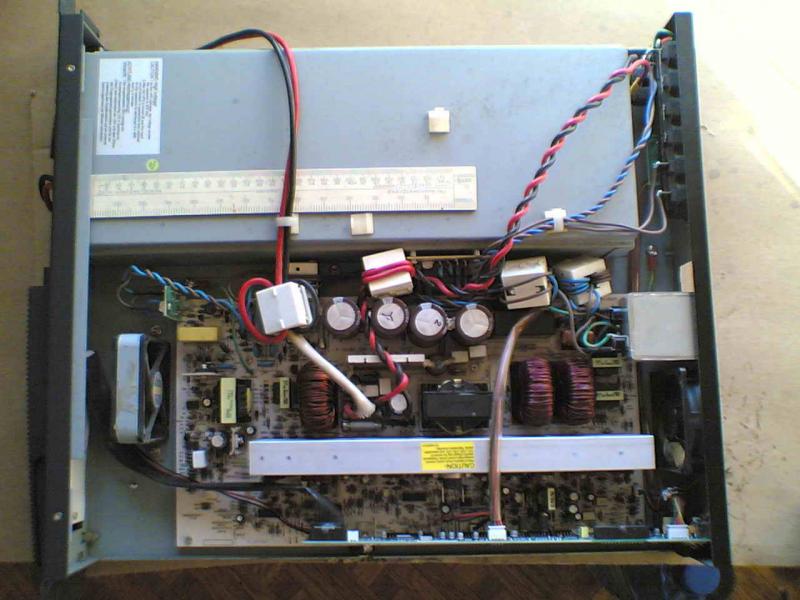
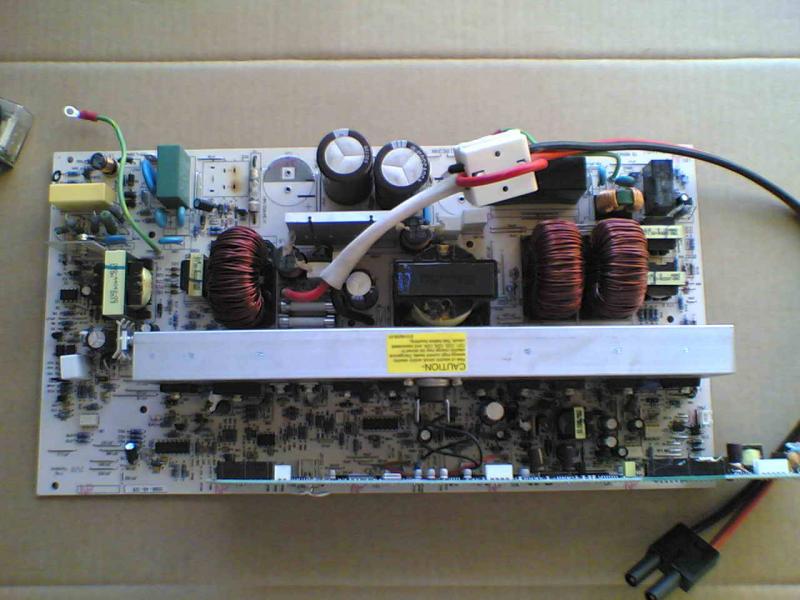
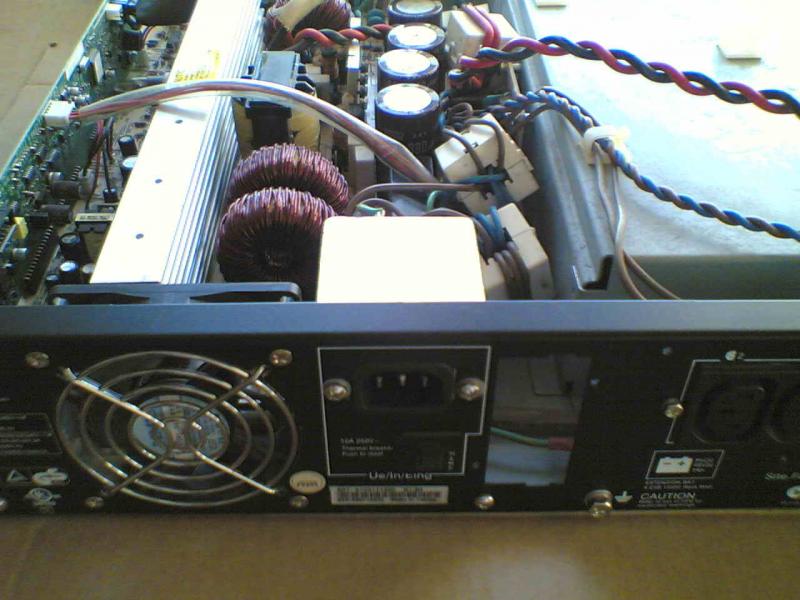
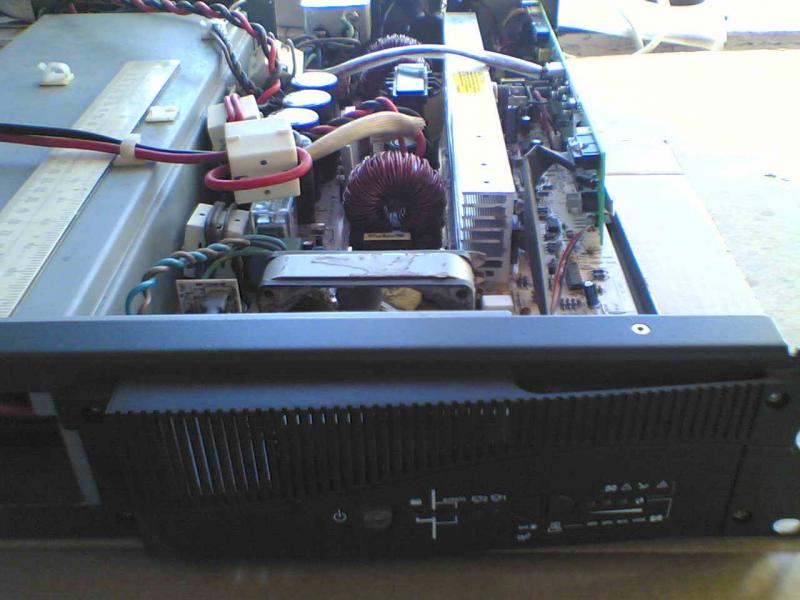
UPS SUNG WEI 06V0-A
UPS SUNG WEI 06V0-A
http://www.rom.by/forum/Izvinite_chto_ne_v_temu_nu_kto_pomozhet_opoznat
http://www.rom.by/files/BP_1_0.jpg


http://www.rom.by/forum/Izvinite_chto_ne_v_temu_nu_kto_pomozhet_opoznat
http://www.rom.by/files/BP_1_0.jpg
Monday, October 27, 2014
How to mount windows share to Linux
How to mount windows share to Linux
mount -t cifs -o user=IRRIAD/sladmin,password=~ws????a+ //172.29.4.30/H /tmp/backup
Take note on :
/
\
sharename = //172.29.4.30/H
mount point in linux box = /tmp/backup
##########################################################
How to check Folder space left..disk space left..
#################
check for disk space of a certain folder.
du -sbh DIR
#################
Backuppc
To copy a complete store (ie: /var/lib/backuppc) using BackupPC_tarPCCopy you should:
- stop BackupPC so that the store is static.
- copy the cpool, conf and log directory trees using any technique (like cp, rsync or tar) without the need to preserve hardlinks.
- copy the pc directory using BackupPC_tarPCCopy:
    su backuppc
    cd NEW_TOPDIR
    mkdir pc
    cd pc
    /usr/share/backuppc/bin/BackupPC_tarPCCopy /var/lib/backuppc/pc | tar xvPf -
irri@backuppc2:/usr/share$ locate BackupPC_zipCreate
/usr/share/backuppc/bin/BackupPC_zipCreate
¬¬~
sudo Backuppc_zipCreate -h virriadfs -n -1 -c 3 "-s f /gis1" > /home/irri/gis1.zip
sudo /usr/share/backuppc/bin/BackupPC_zipCreate -h virriadfs -n -1 -c 3 "-s f /gis1" > /home/irri/gis1.zip
/usr/share/backuppc/bin/BackupPC_zipCreate -h virriadfs -n -1 -c 3 "-s f /gis1" > gis1.zip
/usr/share/backuppc/bin/BackupPC_zipCreate -h virriadfs -n -1 -c 3 -s gis1 / > /tmp/gis1.zip
/usr/share/backuppc/bin/BackupPC_zipCreate -h irriad1 -n -2 -c 3 -s elyt / > /tmp/elyt.zip
/usr/share/backuppc/bin/BackupPC_zipCreate -h virriadfs -n -1 -c 3 -s abcd / > /tmp/abcd.zip
/var/lib/backuppc/pc/virriadfs/94/fF$/fGIS1
/usr/share/backuppc/bin/BackupPC_tarCreate -h virriadfs -n -189 -s "fF$/fGIS1 /" > /tmp/gis1.tar
/usr/share/backuppc/bin/BackupPC_tarCreate -h virriad1 -n -189 -s / / > /tmp/gis1.tar
Conf{SmbClientIncrCmd} = '$smbClientPath \\\\irriad1\\elyt'
/usr/share/backuppc/bin/BackupPC_tarCreate -t -h virriadfs -n 94 -s F$ / > /tmp/gis1.tar
/usr/share/backuppc/bin/BackupPC_tarCreate -h virriadfs -n 90 -s F$ / > /var/lib/backuppc/nanie/pps.tar
~h1n0g#
mount -t cifs -o user=IRRIAD/sladmin,password=~wsw3ma+ //172.29.4.30/H /tmp/backup
Thursday, September 18, 2014


Monday, September 1, 2014
My Solid State Relay
S16J11S-24 S16J11S 24VDC Solid State Relay 240 V AC /16 Amp
http://www.aliexpress.com/item/10pcs-lot-New-Original-S16J11S-24-S16J11S-24VDC-Solid-State-Relay/1873350531.html
I found my old
Solid State Relay in my old Electronics Box (Baul)...


http://www.omega.com/temperature/Z/pdf/z124-127.pdf
need a Snubber Circuit R1 and C1

Tuesday, August 19, 2014
My Solar Panel System
BP255 Solar Panel from BP Solar


Specifications
| Electrical Characteristics | |
|---|---|
| STC Power Rating Pmp (W) | 55 |
| Open Circuit Voltage Voc (V) | 21.2 |
| Short Circuit Current Isc (A) | 3.54 |
| Voltage at Maximim Power Vmp (V) | 17.0 |
| Current at Maximim Power Imp (A) | 3.23 |
| Panel Efficiency | 13.2% |
| Fill Factor | 73.3% |
| Power Tolerance | |
| Maximum System Voltage Vmax (V) | |
| Maximum Series Fuse Rating (A) | |
| Temperature Coefficients | |
| Temperature Coefficiency of Isc | |
| Temperature Coefficiency of Voc | |
| Temperature Coefficiency of Pmp | |
| Mechanical Characteristics | |
| Cell Type | Monocrystalline Cell |
| Cell Size(mm) | |
| Cells | 36 |
| Dimensions | 927.0 × 448.0 × 38.5mm (17.6 × 36.5 × 1.5 inch) |
| Weight | 5.9Kg (13.0 lbs) |
| Junction Box (Safety Rating, Bypass Diodes) | |
| Positive Cable (Length, Cable Cross-Section) | |
| Negative Cable (Length, Cable Cross-Section) | |
| Plug Connector (Type, Safety) | Dose |
| Front Cover (Thickness,Material) | |
| Backsheet Cover (Color, Thickness, Material) | |
| Encapsulation Materials | |
| Frame Material | Aluminium |
| Operation Conditions | |
| Nominal Operating Cell Temperature (NOCT) | |
| Operating Temperature | |
| Maximum Load | |
| Hail Storm Rating | |
| Fire Safety Rating | |
My 20A PWM SUOER ST-G1220 Solar Charge Controller 12v / 24v
After I bought sa Raon Sta,Cruz Manila for P800 Binaklas ko agad Open to see whats inside

LM293 LOW POWER DUAL VOLTAGE COMPARATORS

TM1628 LED driver chip


Removed four screws from the back aluminum cover/heatsink:

A dual op amp and MCU:

RU40190R output switch mosfet:
HY3506 PV input switch mosfets:

Mode 17 settings
1. EZ338
2. SC91F729BM FLASH ROM MCU
3. LM293 LOW POWER DUAL VOLTAGE COMPARATORS
4. TM1628 F131221BC4629XT LED driver control
http://www.ram-e-shop.com/ds/general/KT1220P_solar_charge_con2.pdf
http://www.quan-diy.com/misc/scc/mppt.htm
I need to Buy :
Motollite SolarMaster Deep Cycle Battery
Solar Watt Meter
Pure Sine wave Inverter
2
Subscribe to:
Posts (Atom)